
BuckeyeMail (lastname.#@buckeyemail.osu.edu) is your official Ohio State University, OSU email account. While you are an extended education student at Ohio State, important and time-sensitive business communications from the university.
These are your enrollment registration window notification and communications from your instructors and advisors – will be emailed to your OSU Buckeye Mail account.
Your Buckeye Mail also gives you access to Microsoft Office 365, which Ohio State students are eligible to use for free.
Your Office 365 ID is your full Buckeye Mail address and the password you chose when you activated your Ohio State username.
Table of Contents
- How to log into osu buckeyemail
- How to activate your buckeyemail
- Checking your osu email
- Buckeye Link
How to log into osu buckeyemail
To get started using OSU WebMail,
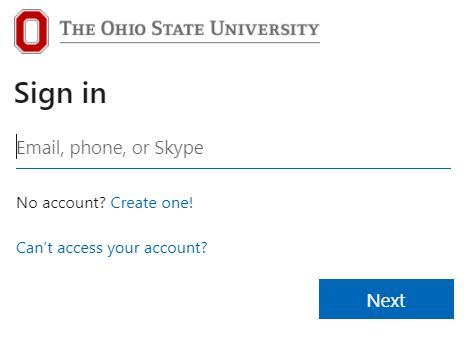
- Navigate to buckeyemail.osu.edu. This will redirect you to a different page – login.microsoftonline.com.
- The page will prompt you to “Sign in to Office 365” and password.
- Enter your OSU email address as the username (lastname.#@buckeyemail.osu.edu)
- Enter your standard OSU password.
- Then, click “Sign In“.
Check your email several times a week until school begins, and then daily.
Related:
- CSE 2231: Software II, Software Development and Design.
- OSU Academic calendar: Important Dates and deadlines.
How to activate your buckeyemail
Activating your Ohio State BuckeyeMail is an important next step in the admissions process.
To activate your OSU student email,
- Go to my.osu.edu and log in
- On the left side of the page, click “Change Email Delivery“
- Select my Buckeye Mail account and submit
- Allow up to 90 minutes for your request to be processed. Then, you’ll be able to log in to send and receive emails.
- When logging in, be sure to use your full email address (lastname.#buckeyemail.osu.edu.
Checking your osu email
After successfully logging in, you’ll be redirected again, this time to outlook. office365.com. Make sure to bookmark buckeyemail.osu.edu and this page, NOT login.live.com or outlook.com directly.
By default (in one of the recommended browsers), you’ll see a list of your folders on the left, a list of messages in your Inbox in the middle, and the currently selected message on the right.
To move between messages, simply click on the message you want to view in the Inbox list. To move between folders, click the folder you want to view from the list at the left.
Buckeye Link
My Buckeye Link is your student account where you can register for classes, view your class schedule, view your statement of account and pay your fees. If you qualify for financial aid, you can manage your financial aid in My Buckeye Link as well.
To access My Buckeye Link:
- Go to buckeyelink.osu.edu
- Select the My Buckeye Link tile under Essential Tasks
Locate Your Assigned Advisor
- Go to buckeyelink.osu.edu
- Select the My Buckeye Link tile under Essential Tasks
- In the Advisor box, select details to view his or her contact information
Register for Classes
Before registering for classes each term, be sure to complete the Financial Responsibility Statement. The Financial Responsibility Statement is listed under the To Do List within My Buckeye Link.
View Your Enrollment Appointment(s)
- Go to buckeyelink.osu.edu
- Select the My Buckeye Link tile under Essential Tasks
- In the Enrollment Information box, select details
- Under Enrollment Dates, select the correct Term then select continue to view your Enrollment Window Registration Appointment(s)


